
Requesting a document signature
Create a signature task with patient, signer, document, and annotation details.
Send a clinical document to a provider on SutureHealth by calling Create Task:
POST /api/v1/signature/tasks
The request has three required objects:
- patient: demographics shown to the signer, and used to match or create the patient
- performers: the signer (NPI) and the organization that should receive the task
- document: the PDF, document type, effective date, and the annotations the signer must complete
A successful create returns 201 with a taskId and status: Received. The task then moves through ingestion (patient match, signer match, annotation placement) until it reaches Pending in the signer’s inbox, or Failed if matching cannot complete.
Use Read Task By Id to follow that progress. See Tracking a document signature for poll and bulk-list patterns.
Before you create a taskLook up the sender’s document types and templates, and optionally confirm the signer exists with Read Provider User By NPI. Details are in Types, templates, and signers.
Task lifecycle
| Status | Meaning |
|---|---|
Received | Create accepted. Ingestion has started. |
Processing | Patient, signer, or annotations are still being resolved. |
Pending | The document is in the signer’s inbox. documentId is populated. |
Completed | The signer signed. The signed PDF is available on read (output.attachment). |
Rejected | The signer rejected the document in Inbox. There is no Partner API reject endpoint. |
Retracted | You retracted the pending task with Retract Task. |
Failed | Ingestion could not finish (for example an unknown signer NPI, or no active document-ingestion integration). Check output.statusReason. |
Cancelled | The task was cancelled and will not complete. |
Typical happy path: Create → Received → Pending → (signer signs) → Completed.
After create, poll Read Task By Id until status is Pending (ready for the signer) or a terminal status (Failed, Cancelled). Do not treat 201 as “already in the inbox.”
1. Patient
Send enough demographics for the signer to recognize the patient and for SutureHealth to match an existing record. Sparse or colliding demographics can delay the task in manual review, which leaves status at Received / Processing.
For Partner API keys these fields are required:
externalId: your stable patient idnames: at least one name withfamilyandgivensex:Male,Female,Unknown, orAmbiguous(this issex, notgender)birthDate:YYYY-MM-DDaddresses: at least one address;postalCodeis required on each address
"patient": {
  "externalId": "ehr-patient-1234",
  "names": [
    {
      "use": "Official",
      "family": "Doe",
      "given": ["Jane"]
    }
  ],
  "sex": "Female",
  "birthDate": "1960-12-25",
  "addresses": [
    {
      "line": "123 Main Street",
      "city": "Springfield",
      "state": "IL",
      "postalCode": "62704"
    }
  ]
}
Identifiers
Add identifiers so we can map your patient to the SutureHealth patient index. Recognized authority values:
ssn: 9-digit Social Security Number (hyphens optional;123-45-6789or123456789)ssn4: last 4 digits of the SSNmrn: Medical Record Number, 6–10 alphanumeric characters
"identifiers": [
  { "authority": "ssn", "value": "123456789" },
  { "authority": "ssn4", "value": "6789" },
  { "authority": "mrn", "value": "00123456" }
]
Reusing a known externalId matches the same patient on later tasks. Telecoms (phone, email) are optional but help the signer.
2. Task performer
The performer is the provider who should sign. Send a 10-digit userNPI and as much organization detail as you have so we can route the task to the correct inbox.
Some signers belong to multiple organizationsSend the organization the patient is related to, not a generic practice NPI.
Routing order:
- Match
organization.orgNPIto an active org of that provider- If not found, match
organization.addressesto an active org of that provider- If organization is omitted or still unmatched, fall back to the provider’s primary org on SutureHealth
"performers": [
  {
    "signer": {
      "userNPI": "1234567890"
    },
    "organization": {
      "orgNPI": "9876543210",
      "name": "Springfield Family Medicine",
      "addresses": [
        {
          "line": "123 Main Street",
          "city": "Springfield",
          "state": "IL",
          "postalCode": "62704"
        }
      ]
    }
  }
]- A well-formed but unknown NPI is accepted on create (
201). The task later moves toFailedduring signer match. Confirm the NPI first with Read Provider User By NPI when you can. - An NPI that is not exactly 10 digits is rejected with
400. - An empty
performersarray is rejected with400.
Multiple signers
Not supported. Send exactly one performer.
3. Document
| Field | Required | Notes |
|---|---|---|
attachment | Yes | PDF encoded as Base64. Non-PDF or invalid Base64 is rejected. |
effectiveDate | Yes | Clinical date (for example start of care), YYYY-MM-DD. This is not the date you send the request. A date outside the template’s certification window is rejected. |
documentTypeId | Yes | From Bulk Read Document Types. |
externalDocId | Yes | Your id for this document. Returned on later reads and usable as a bulk-list filter. |
annotations | Yes | Placement type plus, for templates, templateId. |
diagnosisCode | Conditional | Required when the chosen template has diagnosisCodeRequired: true (typical for Home Health / Hospice certification and recertification). |
templateId belongs on document.annotations, not on document itself. Get ids from Bulk Read Templates. Templates are scoped to the organization on your API key.
"document": {
  "documentTypeId": 1008,
  "effectiveDate": "2026-08-14",
  "attachment": "<PDF Base64>",
  "diagnosisCode": "S97.1",
  "externalDocId": "ehr-doc-1234",
  "annotations": {
    "type": "Template",
    "templateId": 503820
  }
}
4. Annotations
Annotations are the fields the signer completes before signing. Placement type is document.annotations.type:
Template · Json · SmartAnnotations · ReferenceText
Annotation field types (data[].type):
VisibleSignature: signature stampDateSigned: filled automatically with the signature dateTextArea: optionalvaluepre-fills the fieldCheckBox
performer is the 1-based index in performers. Use 1 for the single supported signer.
Template
Reuse a SutureHealth template so annotations land in the same place every time. templateId is required.
"annotations": {
  "type": "Template",
  "templateId": 503820
}
JSON (explicit coordinates)
Ignores template annotation positions and uses only data. Coordinates are a box on the page: left, top, right, bottom. pageNumber starts at 1. required defaults to false.
"annotations": {
  "type": "Json",
  "templateId": 503820,
  "data": [
    {
      "type": "VisibleSignature",
      "pageNumber": 1,
      "left": 40,
      "top": 100,
      "right": 490,
      "bottom": 190,
      "required": true,
      "performer": 1
    },
    {
      "type": "DateSigned",
      "pageNumber": 1,
      "left": 520,
      "top": 100,
      "right": 770,
      "bottom": 190,
      "required": true,
      "performer": 1
    }
  ]
}
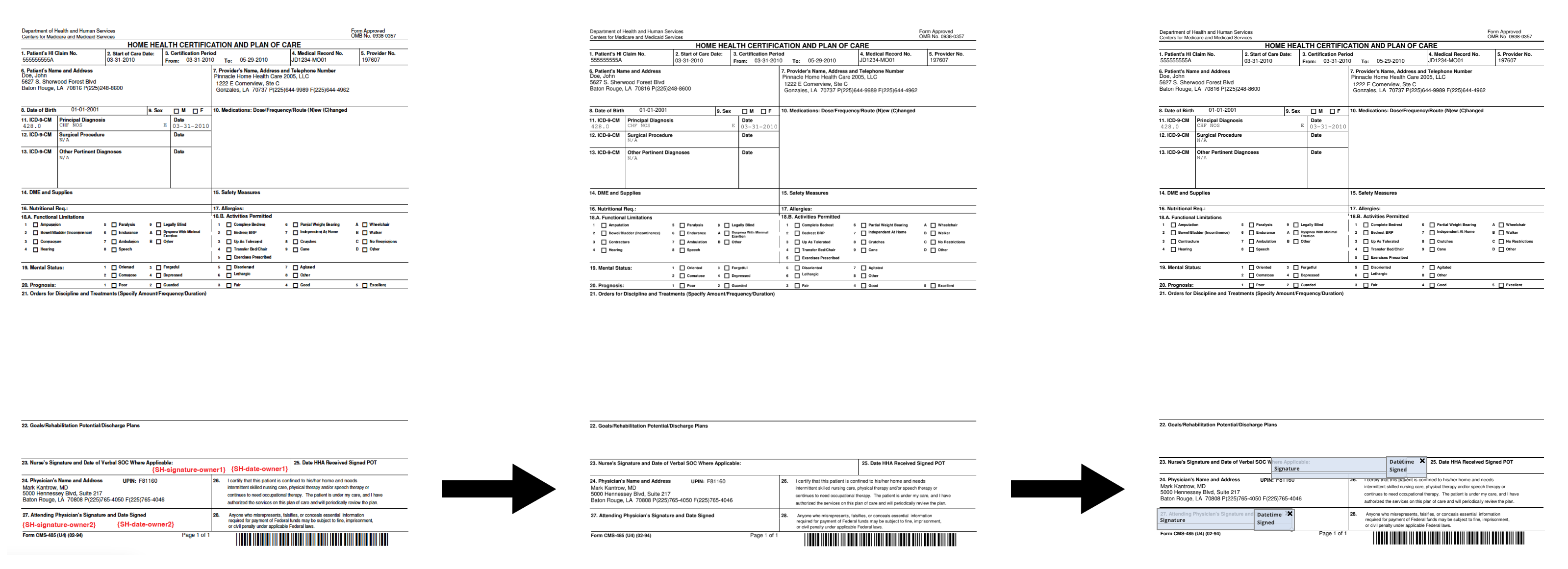
Smart annotations
Embed tokens in the PDF text. The API finds those strings and places the matching field at the top-left of the token.
Supported tokens:
| Token | Field |
|---|---|
{SH-signature-owner1} | Visible signature |
{SH-date-owner1} | Date signed |
{SH-text-owner1} | Text area |
{SH-checkBox-owner1} | Checkbox |
"annotations": {
  "type": "SmartAnnotations",
  "templateId": 503820
}
Use a font color that matches the page background (for example white on white) so the tokens stay invisible if the same PDF is also faxed or printed.
The annotation is placed at the top-left of the token:
Reference text
Place an annotation relative to existing text in the PDF. referenceText, offsetX, and offsetY are required on each data item.
"annotations": {
  "type": "ReferenceText",
  "templateId": 503820,
  "data": [
    {
      "type": "VisibleSignature",
      "required": true,
      "performer": 1,
      "referenceText": "SIGNATURE",
      "offsetX": 10,
      "offsetY": -20
    }
  ]
}
Create response
{
  "taskId": 184392,
  "status": "Received",
  "statusReason": null
}
Store taskId. Then:
- Prefer status webhooks for
Pending/Completed/ terminal statuses; fall back to Read Task By Id if needed. - When the task is
Completed, read the task to downloadoutput.attachment. - After you persist the signed PDF in your system, update the task with your saved-document id. Retract only while the task is still
Pending.
Full request example
{
  "patient": {
    "externalId": "ehr-patient-1234",
    "names": [
      {
        "use": "Official",
        "family": "Doe",
        "given": ["Jane"]
      }
    ],
    "sex": "Female",
    "birthDate": "1960-12-25",
    "addresses": [
      {
        "line": "123 Main Street",
        "city": "Springfield",
        "state": "IL",
        "postalCode": "62704"
      }
    ],
    "identifiers": [
      { "authority": "mrn", "value": "00123456" }
    ],
    "telecoms": [
      { "system": "Phone", "value": "555-010-0100", "use": "Home" }
    ]
  },
  "performers": [
    {
      "signer": {
        "userNPI": "1234567890"
      },
      "organization": {
        "orgNPI": "9876543210",
        "addresses": [
          {
            "line": "123 Main Street",
            "city": "Springfield",
            "state": "IL",
            "postalCode": "62704"
          }
        ]
      }
    }
  ],
  "document": {
    "documentTypeId": 1008,
    "effectiveDate": "2026-08-14",
    "attachment": "<PDF Base64>",
    "externalDocId": "ehr-doc-1234",
    "annotations": {
      "type": "Template",
      "templateId": 503820
    }
  }
}
POST /api/v1/signature/tasks
Host: partner-api.demo.suturehealth.com
x-api-key: YOUR_API_KEY
Content-Type: application/jsonCommon validation errors (400)
400)Create is rejected when any of the following are missing or invalid:
- Patient
externalId,names,sex,birthDate, oraddresses - Empty
performers, or a signer NPI that is not 10 digits - Missing
externalDocIdorattachment - Invalid Base64 or a non-PDF attachment
- Unknown
documentTypeIdorannotations.templateId - Missing
diagnosisCodeon a template that requires it - Invalid
ssn/ssn4/mrnformat
Errors return { "errors": ["…"] }.
Updated 5 days ago